

ScootPad is simplifying your classroom setup! Released in early November, you’ll notice streamlined steps for selecting a learning path. And for school and district site license users, ScootPad will also enable the choice of private and shared learning paths created by teachers and administrators.
Highlights
When adding a new classroom, teachers are first presented with the complete list of curricula for Math and ELA, making it easy to find learning paths aligned to a specific curriculum.

Once the curriculum is selected, the teacher can select a grade level to see all the learning paths that meet the selected curriculum. For teachers who are part of a site-licensed school or district, shared learning paths created privately or shared by another member of the school or district can be selected. These shared learning paths were previously only available from the content library.
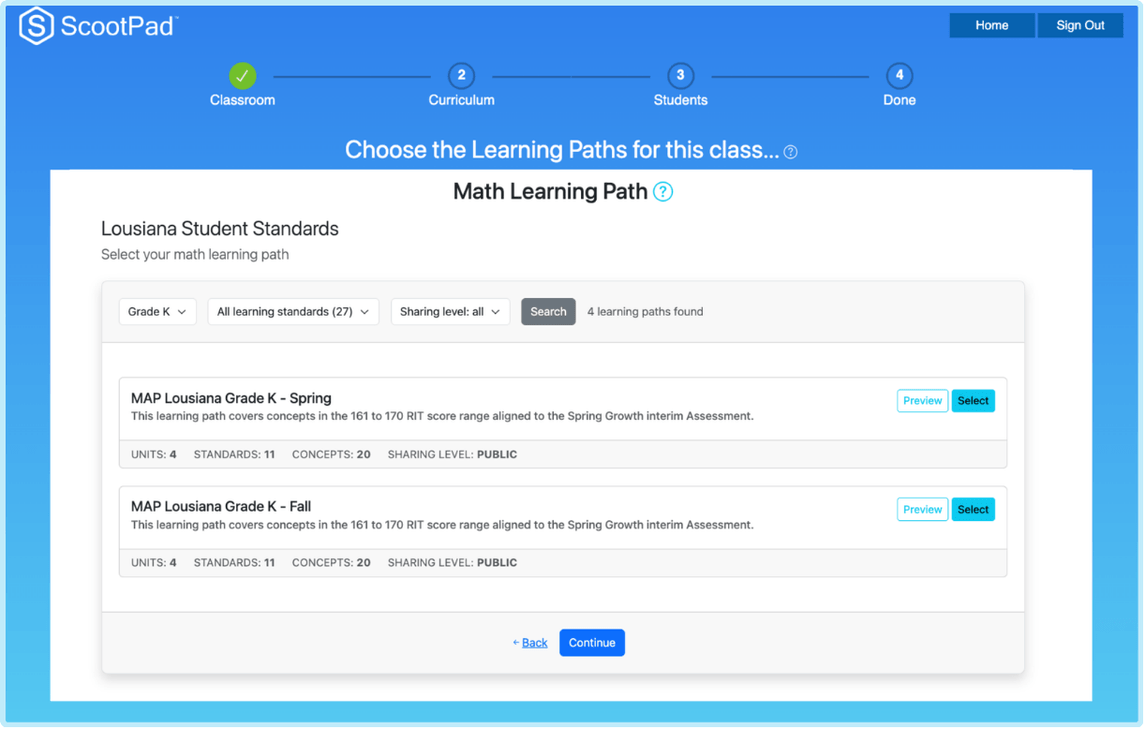
The teacher can preview learning paths, including units, learning standards, and concepts, and assign a learning path to the new classroom.

These streamlined steps will help teachers find, preview, and assign the learning paths that are most relevant for their classrooms.
As always, the ScootPad team is making ScootPad even easier for our community members and we always appreciate your feedback!
Stay in touch!
We invite you to join the ScootPad Community on Facebook!


